TCloud Marketplace

Effortless Cloud Shopping and Up-to-Date Resources for Businesses
Client

TCloud Marketplace

Timeline

4 Months (Jan - Apri 2023)

Team

1 Product Manager
1 Product Designer
2 Engineers

Please be aware that the live website have been updated.

BACKSTORY

BACKSTORY

BACKSTORY

TCloud Marketplace is Taiwan’s leading B2B SaaS platform, offering cloud solutions designed to help small and medium-sized enterprises (SMEs) grow. The platform aims to make it easy for SMEs to subscribe to the right solutions for their business needs.

ISSUE

ISSUE

ISSUE

Data from the previous platform revealed low overall engagement. Many users felt lost when navigating the site and had difficulty finding the right solutions efficiently. That’s why TCloud Marketplace approached us.

MY ROLE

MY ROLE

MY ROLE

As the sole product designer, I led the redesign of end-to-end user flows across both the front-end experience and the back-end content management system. I conducted heuristic evaluations and reviewed GA4 data to identify key usability issues, then validated solutions with real users through high-fidelity prototyping to ensure a user-centred design approach.

OUTCOME

OUTCOME

OUTCOME

The redesigned platform features intuitive navigation and a clear information structure, enabling users to easily find the solutions they need. Moreover, a streamlined purchase flow allows them to complete transactions efficiently, while up-to-date successful user stories strengthen trust in the platform.

36%

relative increase in conversion rate (8% to 11%) in Q1

36%

relative increase in conversion rate (8% to 11%) in Q1

36%

relative increase in conversion rate (8% to 11%) in Q1

20%

point growth in user engagement

20%

point growth in user engagement

20%

point growth in user engagement

BEFORE&AFTER

BEFORE&AFTER

BEFORE&AFTER

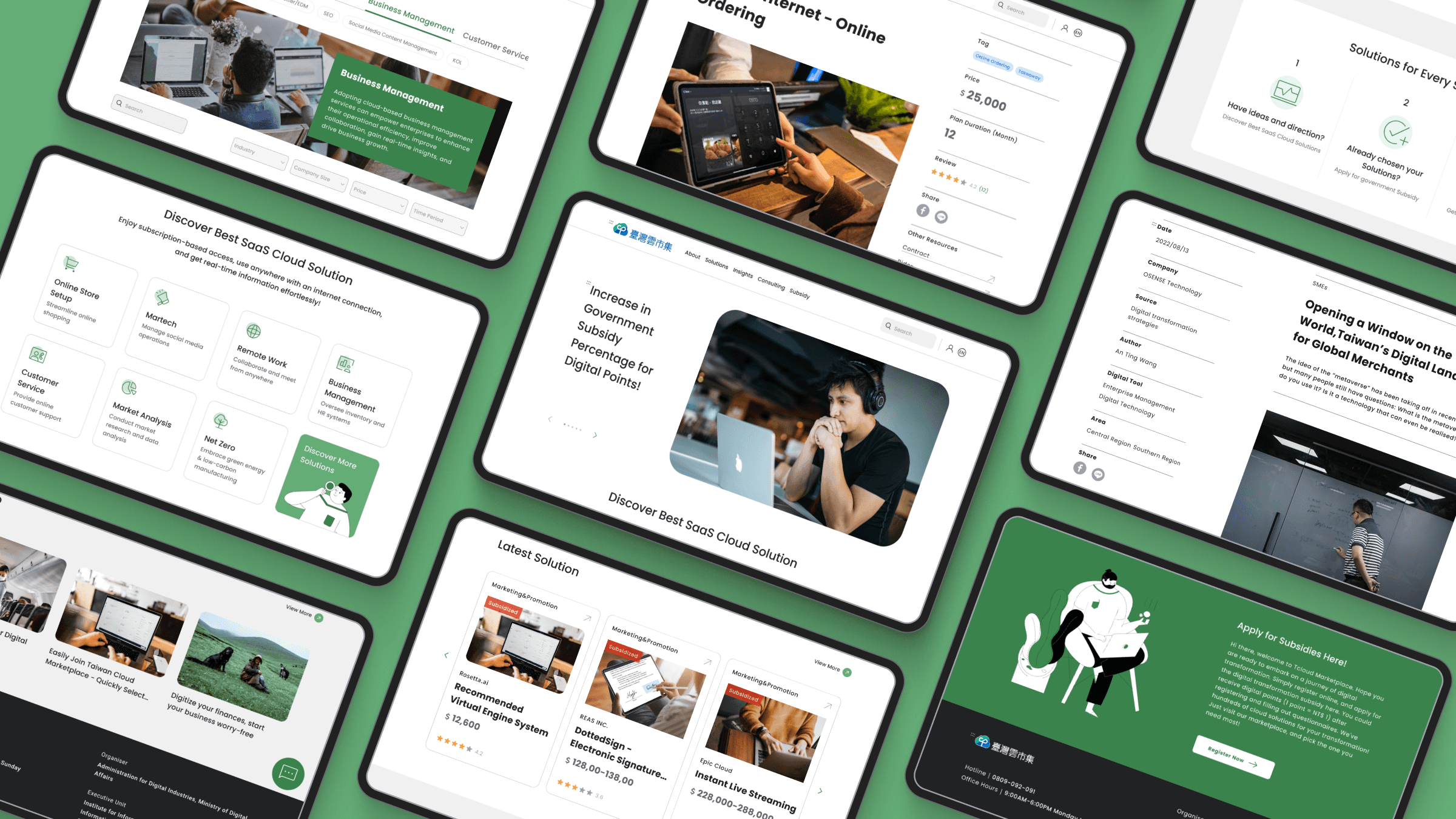
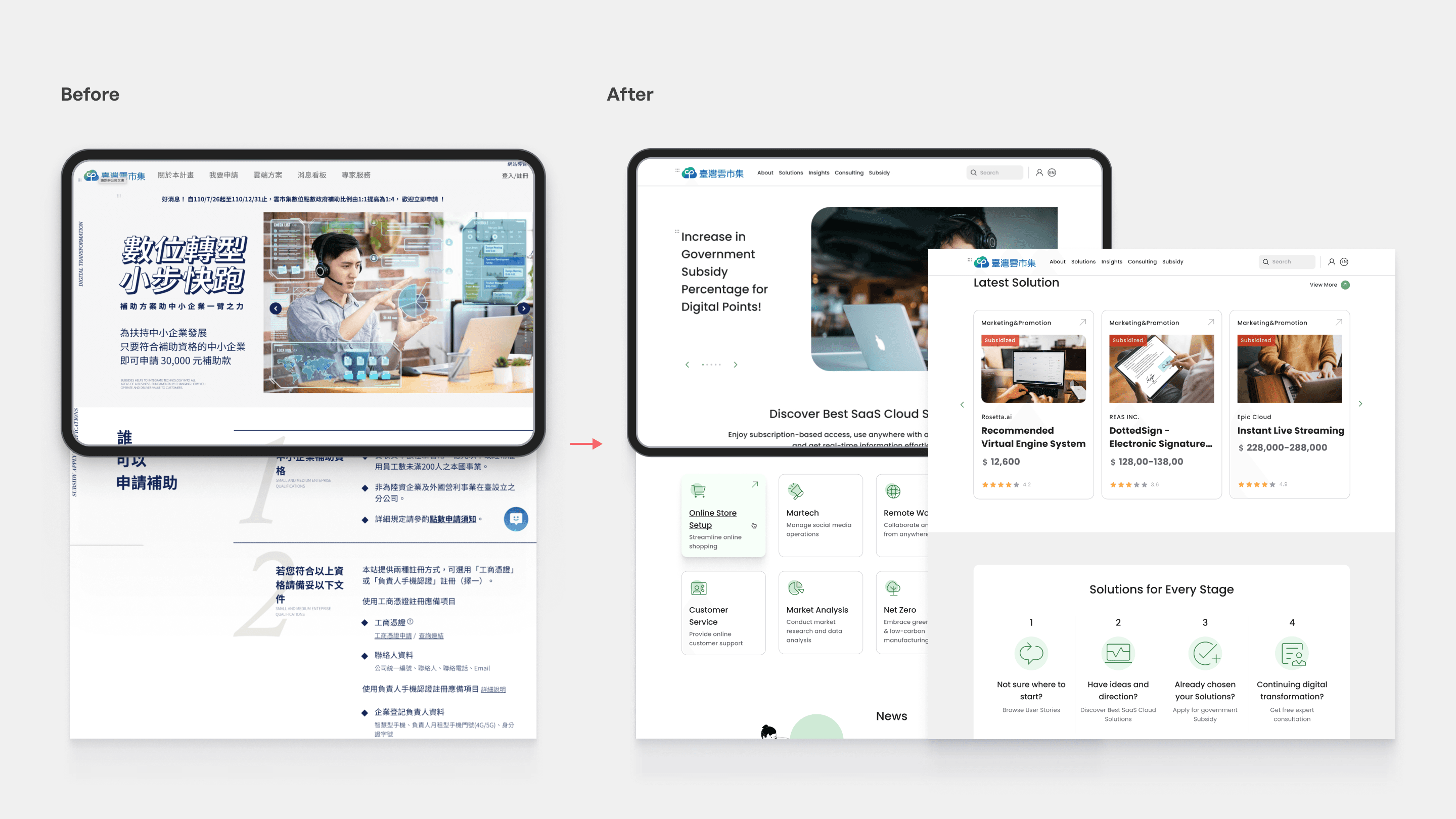
Streamlined Homepage Motivates Solution Exploration

The new homepage features intuitive navigation that streamlines the user journey, connecting customers with relevant solutions and real-time information faster than ever.
BEFORE&AFTER

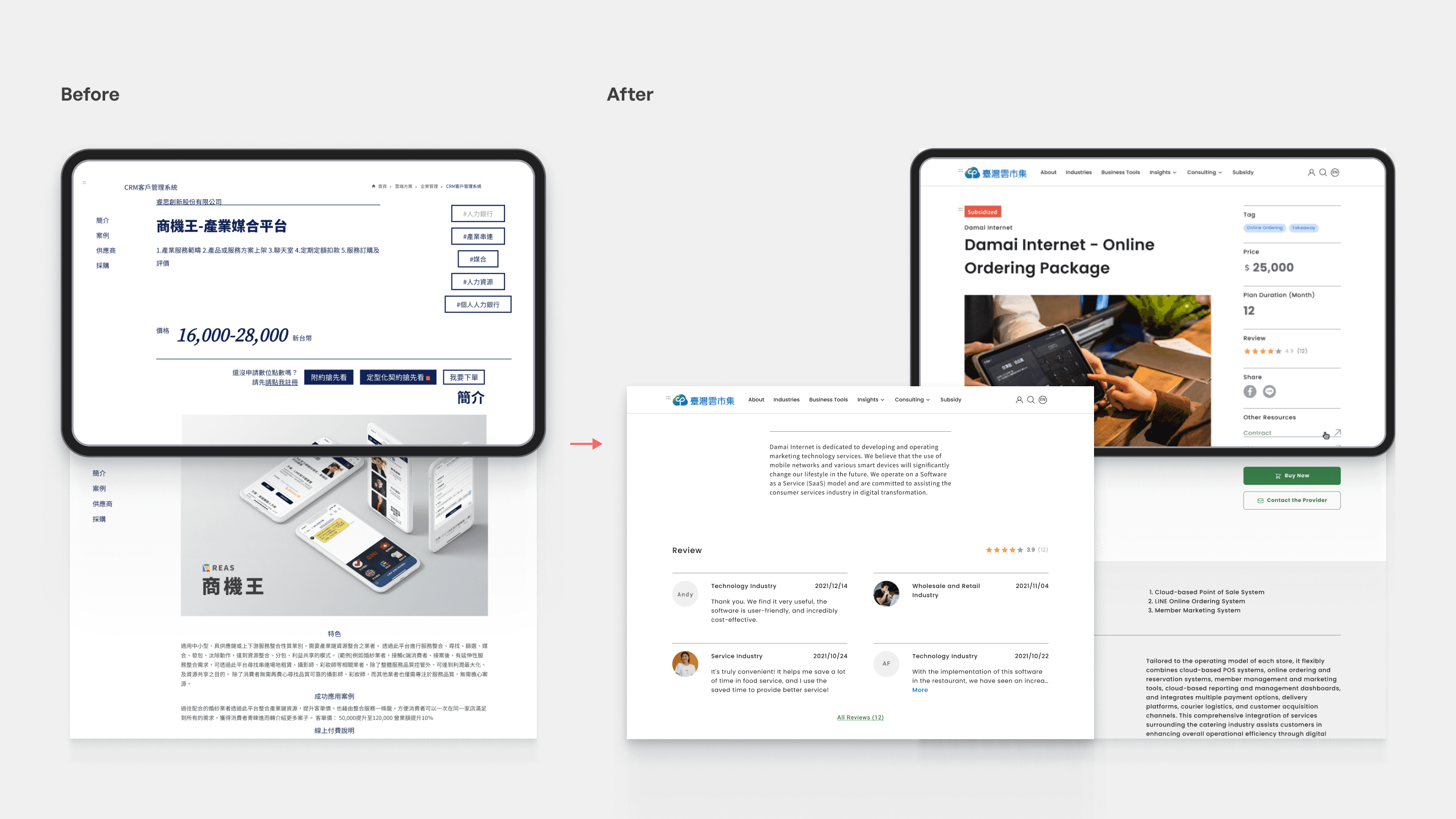
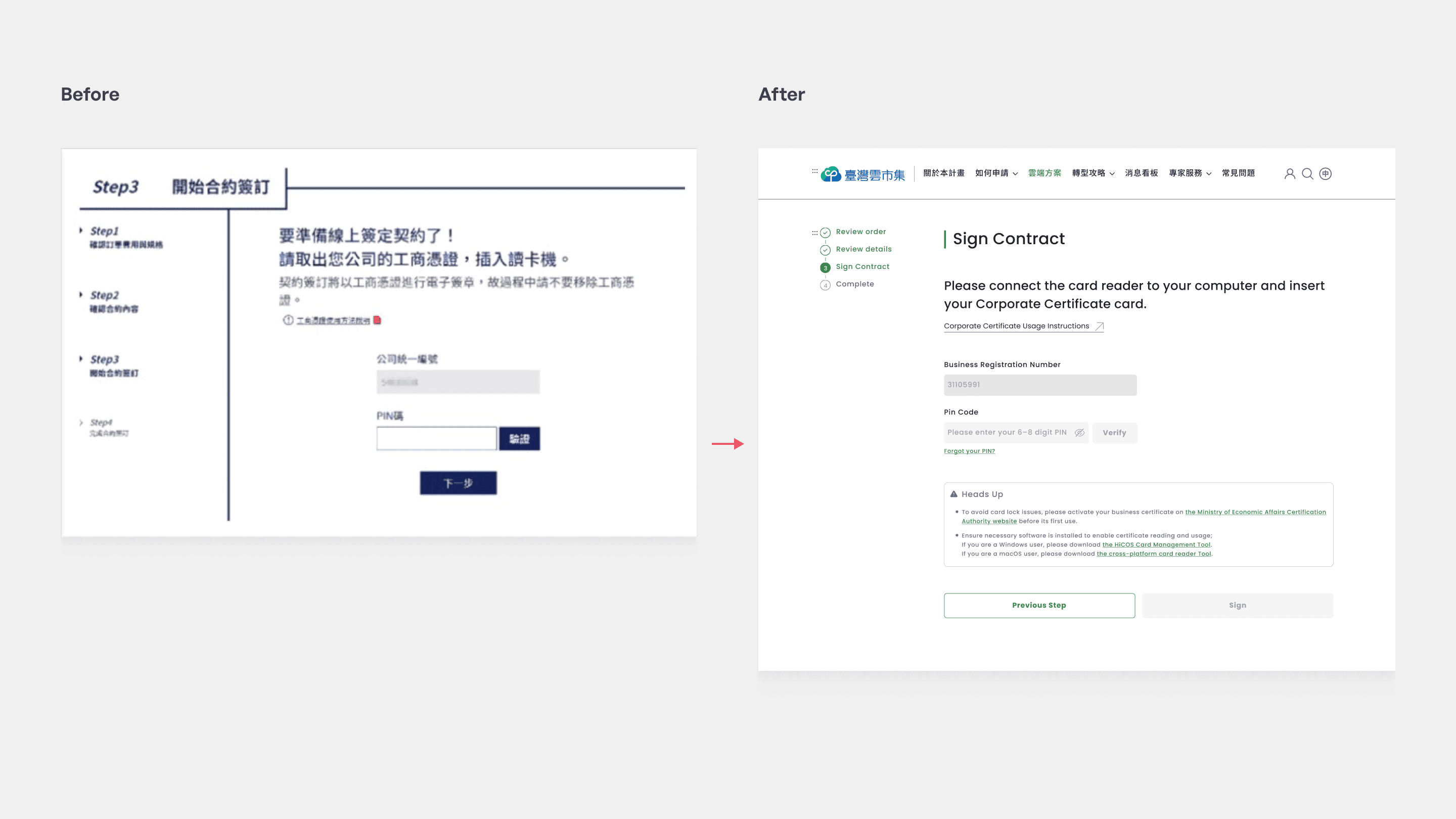
Optimised Purchase Flow Reduces User Friction

Below are two pages example that used to have the highest repeat rates:

  1. The redesigned solution detail page replaces clutter with a structured layout and high-contrast CTAs. This allows users to digest technical specifications at a glance and move toward a purchase decision with total confidence.

  1. The updated verification page introduces proactive 'heads-up' guidance and prominent CTAs to minimise user error. This design shift ensures a 'right-first-time' experience, significantly reducing the friction of unnecessary repeat attempts."
PROCESS IN SHORT

I started by analyzing GA4 data and conducting a heuristic evaluation to identify key usability issues. Based on these insights, I defined the core problems and reorganised the information architecture around user scenarios. I then iterated on layouts, navigation, and CTAs through multiple design rounds, refining clarity and flow. Finally, I reviewed and adjusted the designs to ensure usability, consistency, and a polished final experience.

RESEARCH

Review Data to Uncover User Needs

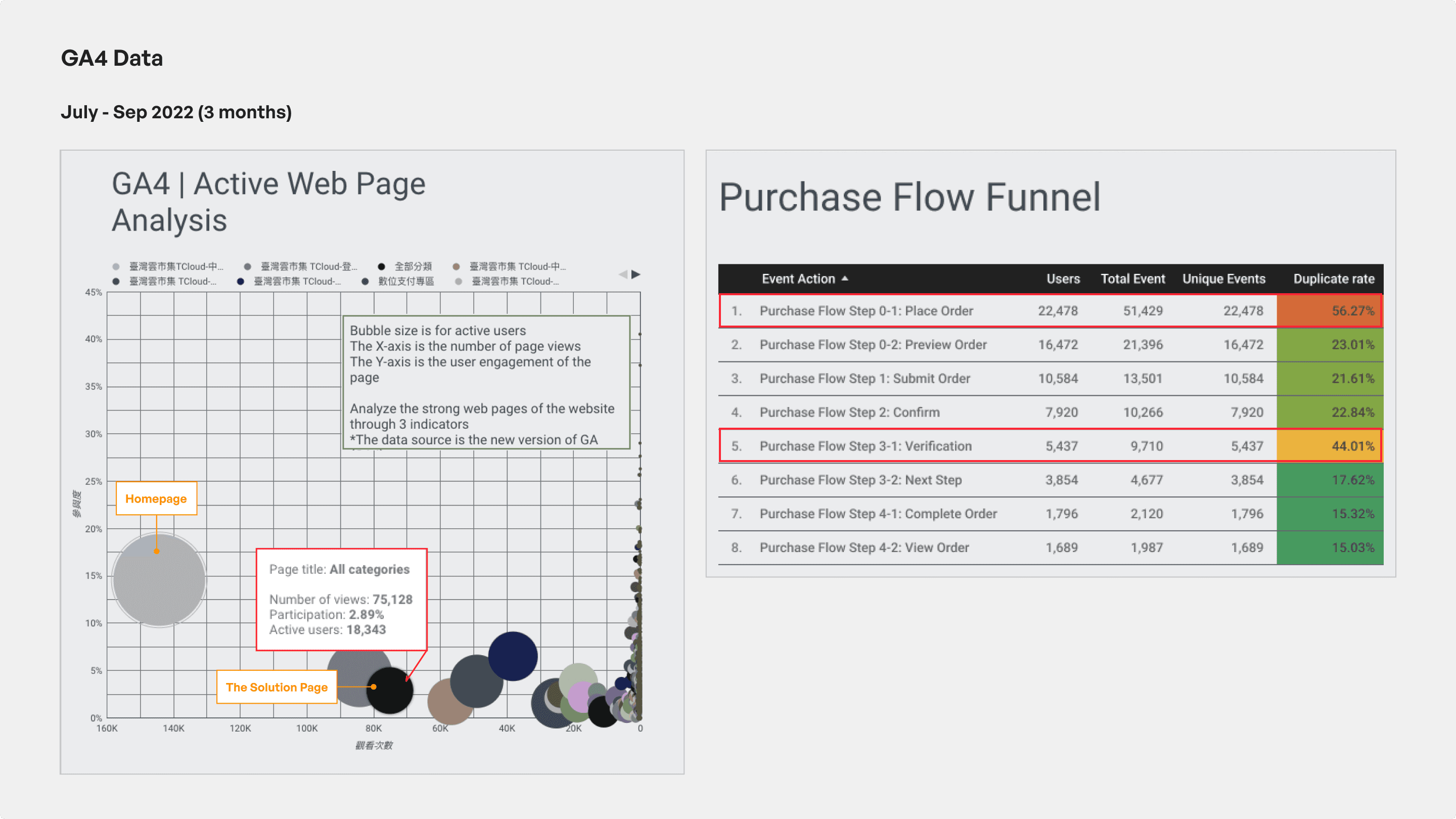
To uncover the real user journey and prioritise design improvements, I asked the client for GA4 data to support our initial decisions. Below were the identified main issue:

  1. Active Web Page Analysis:
    a. Most bubbles (pages) clustered in the low-engagement and low-traffic area, with only a few pages showing large bubbles (active users). 
    b. The solution page showed relatively low engagement, suggesting that the navigation is unclear.

  2. Purchase Flow Funnel:
    The purchase steps 0-1 and 3-1 show a high duplicate rate, which points to unclear UI feedback and an overly complex verification process.

RESEARCH

Use Heuristic Evaluation to Identify Usability Issues 

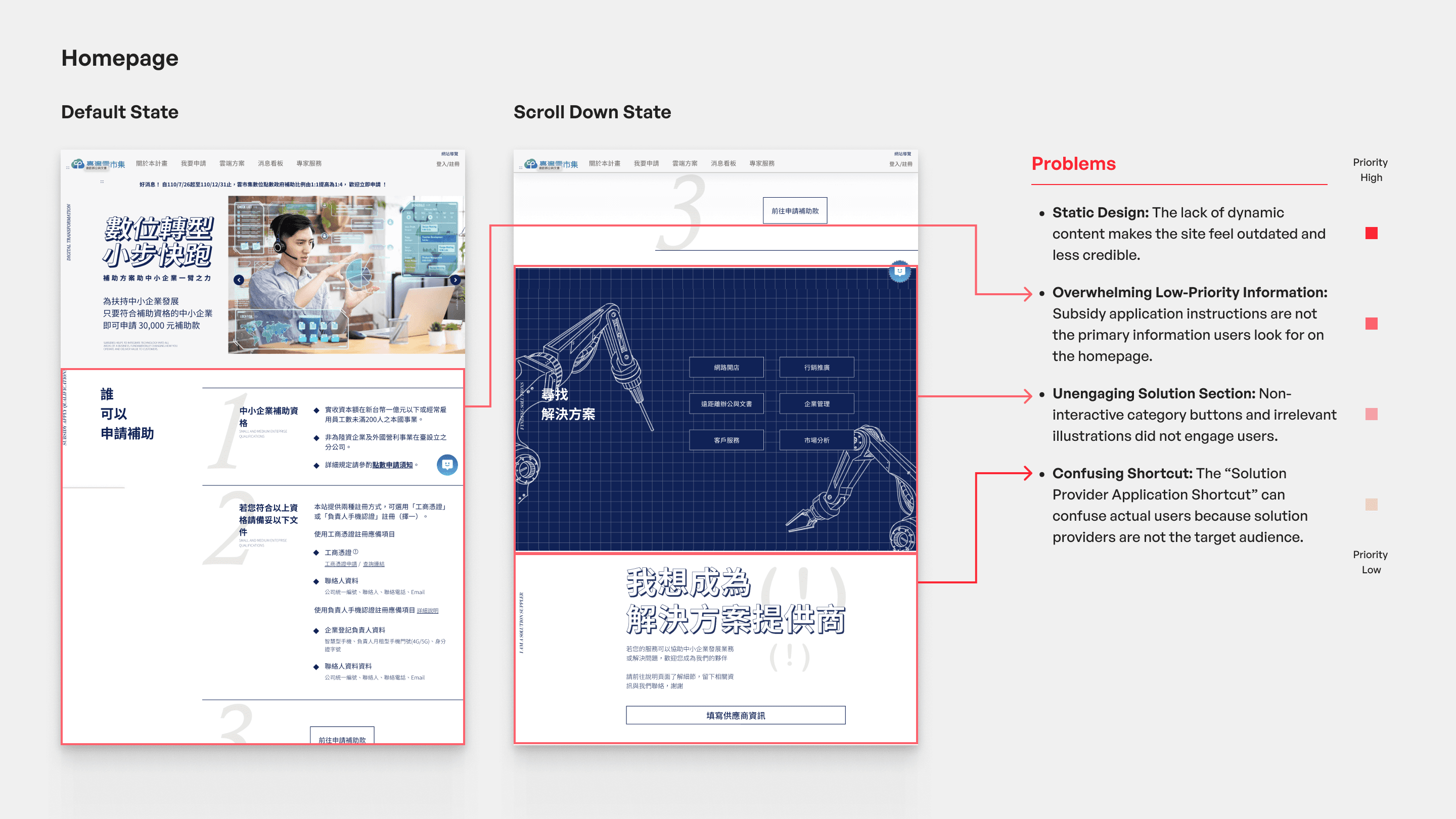
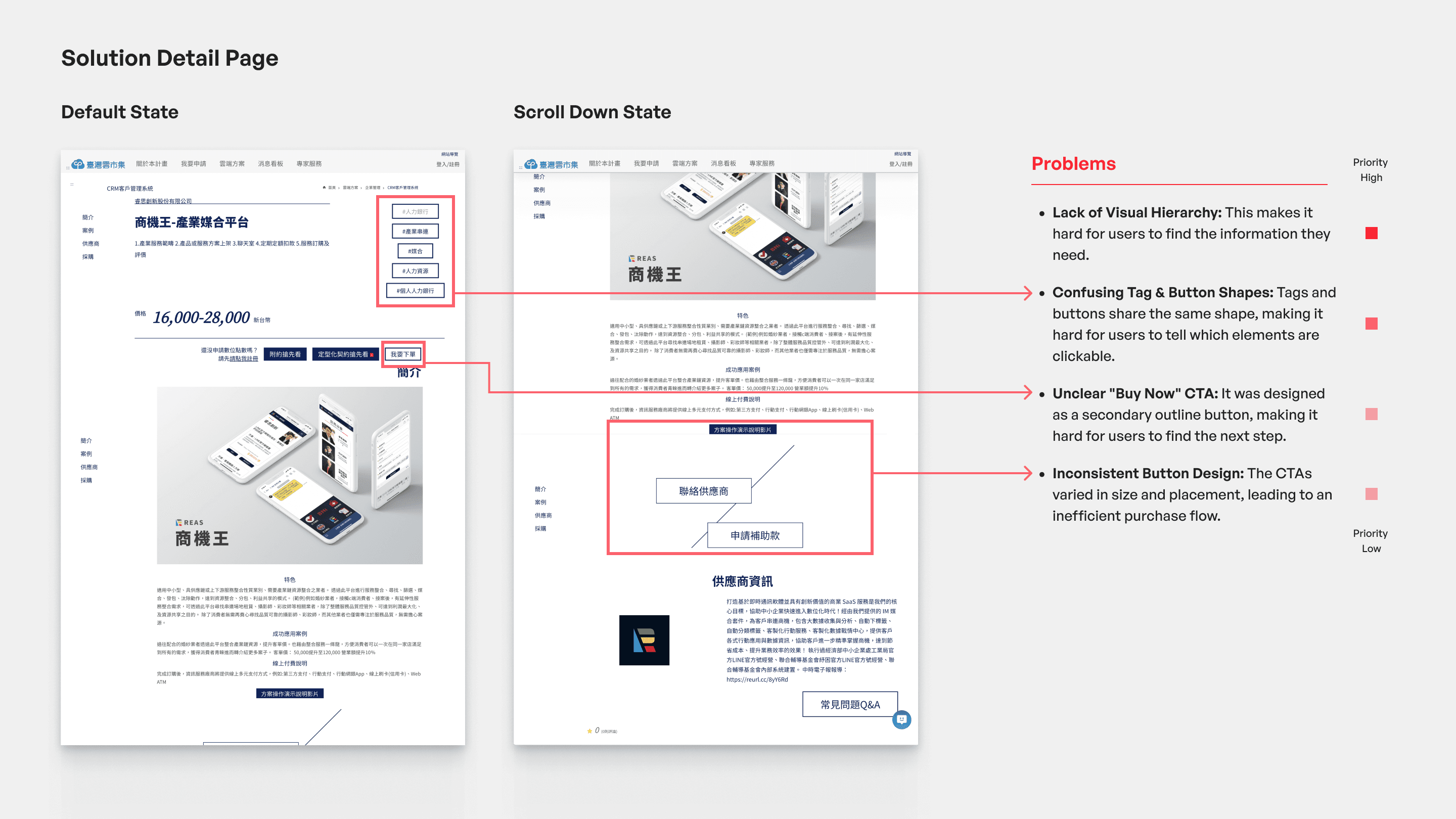
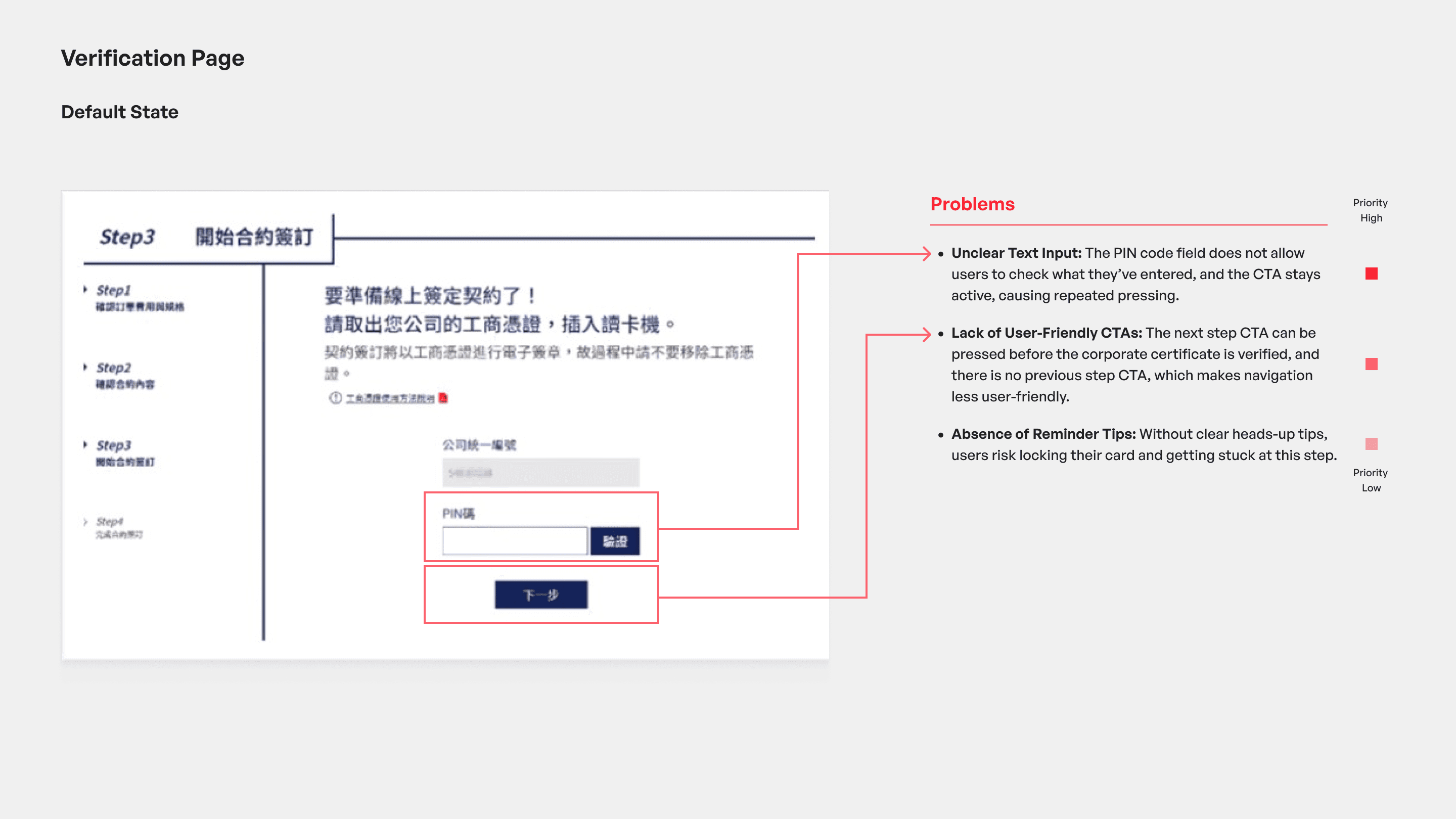
Based on the data insights, I conducted a heuristic evaluation with team members to better understand the usability issues. We identified several critical problems, especially on the homepage and on purchase steps with the highest repeat rates, such as the solution detail and the verification pages.

  1. Homepage: Prioritised low-value information instead of guiding users to explore and compare solutions.

  1. Solution Detail Page: The layout was cluttered, making key features and benefits hard to scan. CTAs lacked visual hierarchy and clarity.

  1. Verification Process: Users faced friction due to unclear input requirements, ambiguous CTAs, and missing reminders about next steps.

  1. Trust & Credibility: The absence of case studies or real examples reduced user confidence and made it harder to evaluate the offering.

DESIGN GOALS

Design Goals to Keep Decisions User-Centred

To address the identified issues, I thoughtfully defined the design goals:

Improving Hompage Navigation to Solutions

Guide users to quickly discover relevant solutions and supporting information.

Simplify Solution Detail Presentation

Group and structure information clearly, helping users identify key features at a glance.

Clarify the Purchase Process

Streamline inputs, strengthen CTA clarity, and add timely reminders to reduce friction and errors.

Build Trust with Practical Content

Use real, verifiable examples to demonstrate how the product solves real-world business problems.

IDEATION

Restructure Information Architecture after Quantitative & Qualitative Research

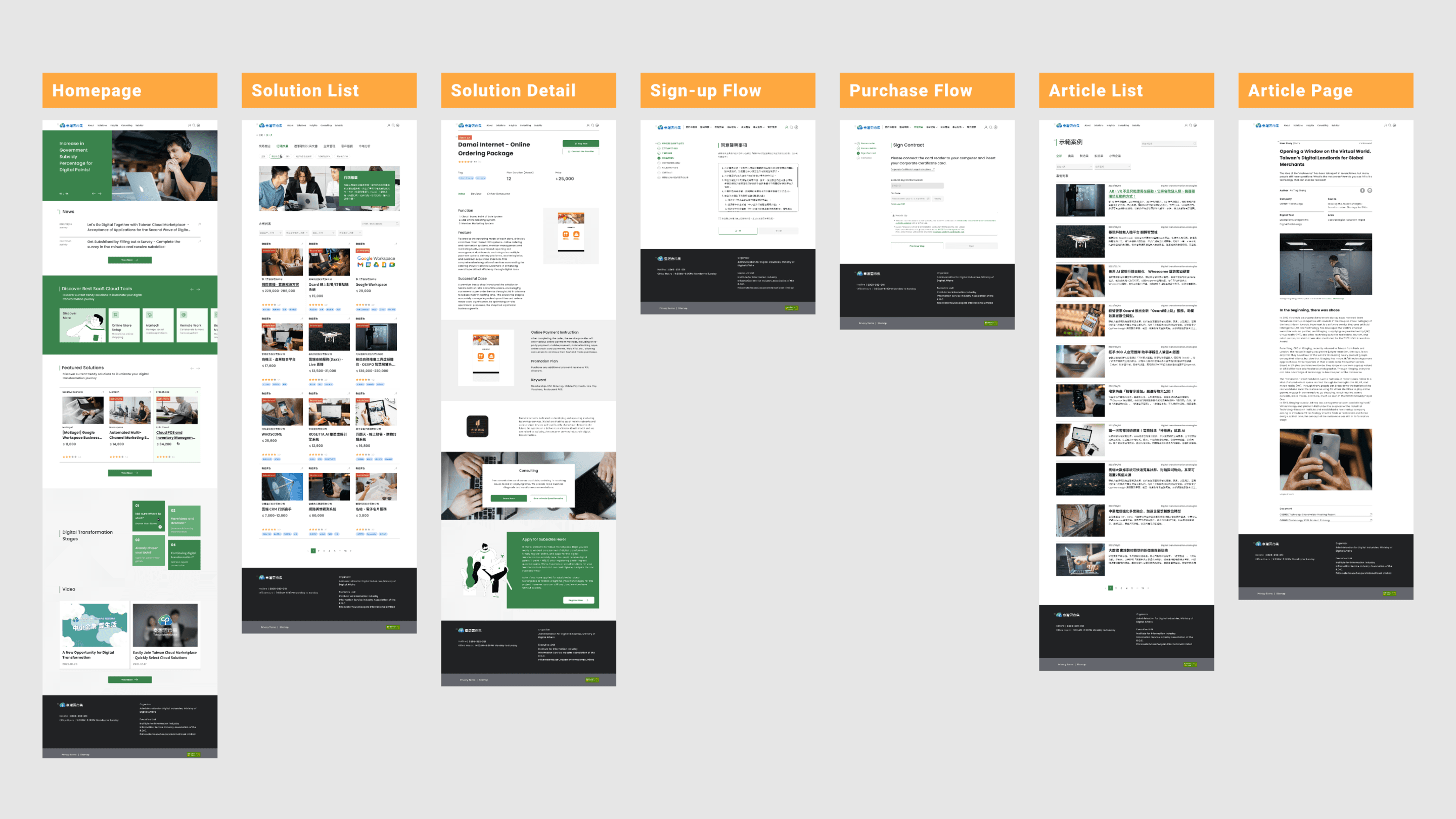
After reviewing data and conducting a heuristic evaluation, I identified the need to reorganise the information architecture. Working with the PM, we restructured content around key user scenarios.

We improved solution discovery by adding “Latest Solutions” and “Solutions for Each Stage” to the homepage, while moving low-priority content off the homepage but keeping it accessible elsewhere.

To build trust, I also proposed an “Insights” page featuring real user success stories that show how the product solves real business problems.

Watermark

DESIGN

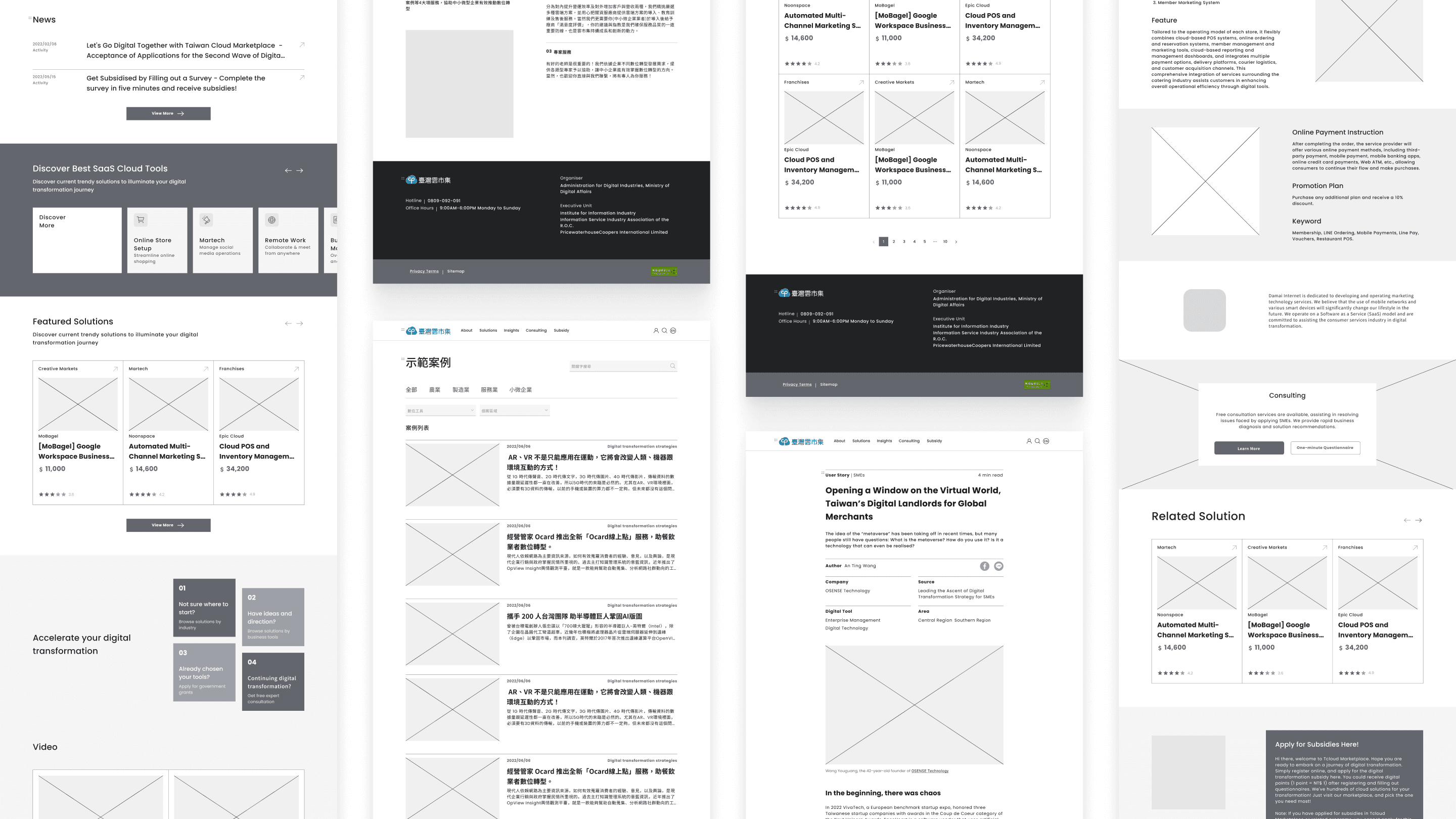
Wireframes to Clarify Information and Function Needs

At the ideation stage, I designed most pages using the new information architecture, giving us a clear structure for the next detailed design phase.

VALIDATION

First Version for User Testing

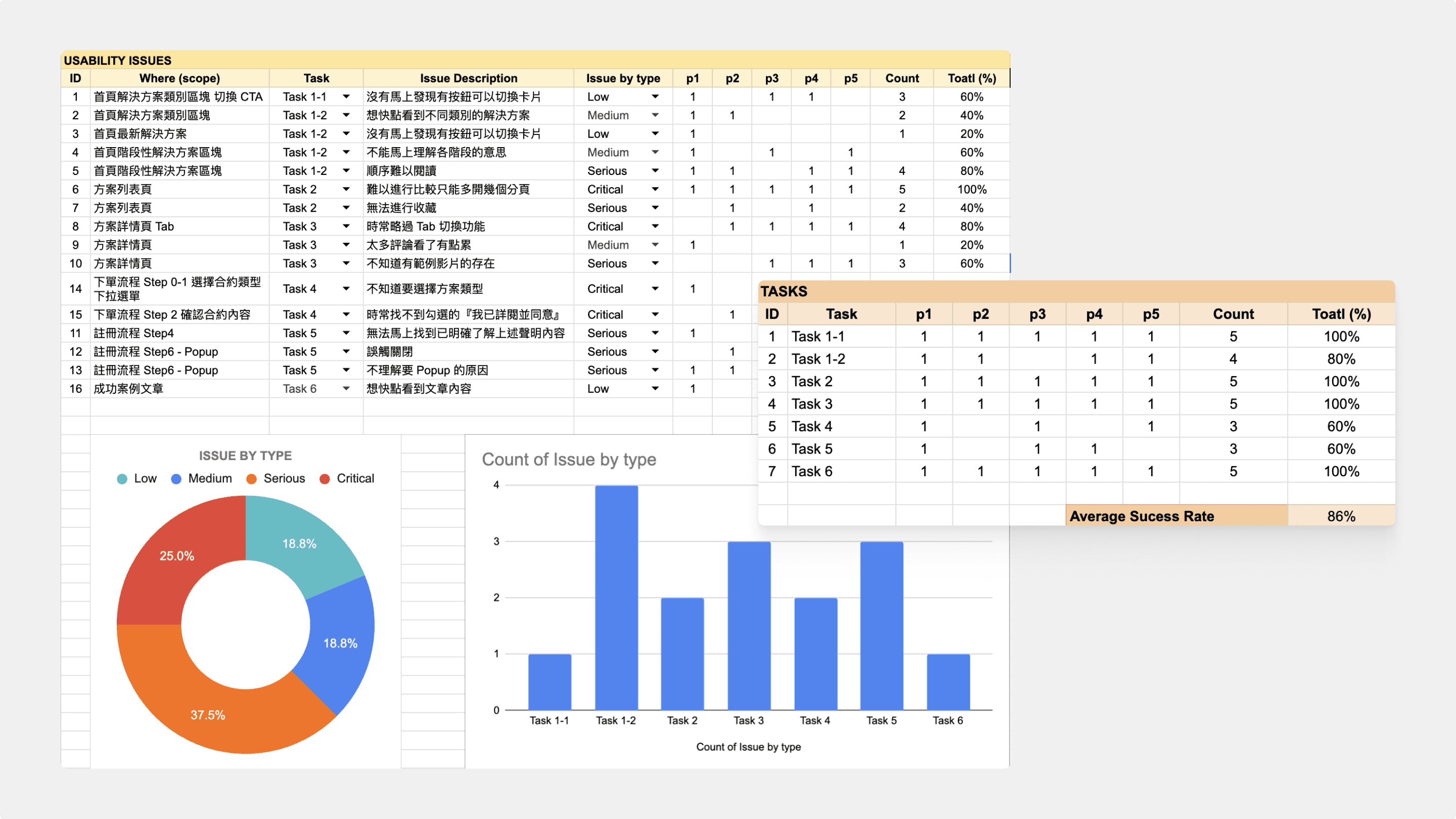
At this stage, my team and I conducted a focus group with 5 SMEs from different industries to test usability and understand user needs. As the host of the session, I had the valuable opportunity to present our designs to target users, engage directly with them, and gather customer insights. This feedback was crucial in enhancing the overall usability.

MEET THE DESIGN GOAL

Following usability testing, I systematically collected and weighted all identified problems, then prioritised them from most to least critical.

VALIDATION

Faster Solution Discovery on the Homepage

The homepage was redesigned to make solution discovery clearer and easier. I brought all solution categories to the front and improved the visual hierarchy so users can scan and choose faster. For the “Solutions for Every Stage” section, I used a left-to-right layout to naturally guide users through each step, while clearer navigation and cleaner visuals help the page feel more consistent and professional.

Watermark

VALIDATION

Make Key Info Easier to Find on the Solution Page

The new design replaces the tabs for a single-page scroll format. Also, I’ve moved key info to the right sidebar so users can easily find the important info. Plus, I added anchor links in the review section, making it super easy to jump straight to more reviews

Watermark

VALIDATION

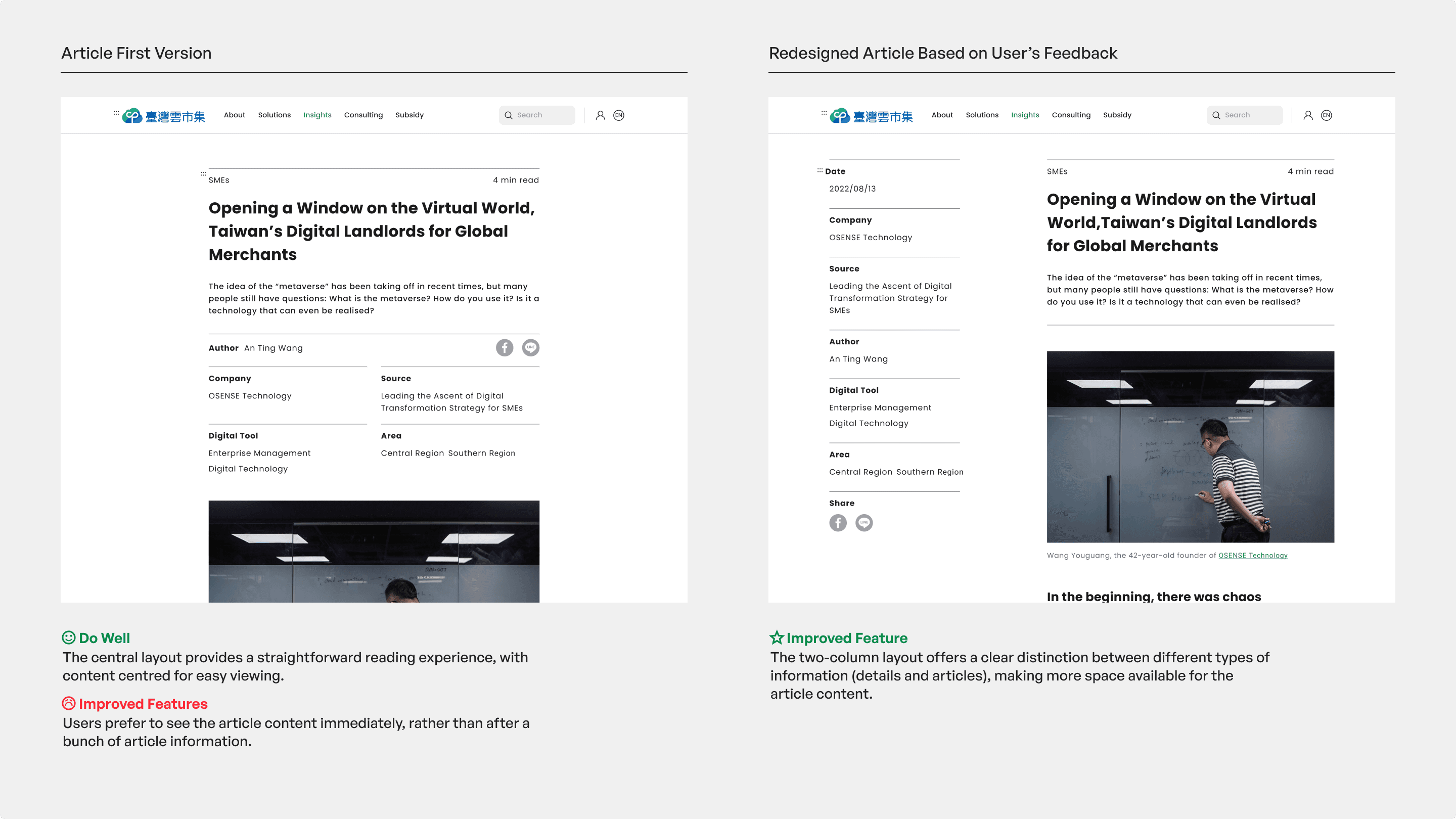
Reduce Scrolling and Searching on the User Story Page

I implemented a two-column layout for faster content access. This streamlines information hierarchy, making key details and articles easier to scan, helping users find relevant information with less effort.

PROCESS IN SHORT

I started by analyzing GA4 data and conducting a heuristic evaluation to identify key usability issues. Based on these insights, I defined the core problems and reorganised the information architecture around user scenarios. I then iterated on layouts, navigation, and CTAs through multiple design rounds, refining clarity and flow. Finally, I reviewed and adjusted the designs to ensure usability, consistency, and a polished final experience.

PROCESS IN SHORT

I started by analyzing GA4 data and conducting a heuristic evaluation to identify key usability issues. Based on these insights, I defined the core problems and reorganised the information architecture around user scenarios. I then iterated on layouts, navigation, and CTAs through multiple design rounds, refining clarity and flow. Finally, I reviewed and adjusted the designs to ensure usability, consistency, and a polished final experience.

FINAL DESIGN

FINAL DESIGN

FINAL DESIGN

The redesigned platform improves solution discovery and decision-making by clarifying navigation, simplifying solution details, and surfacing relevant user stories. Clear categorisation on the homepage helps users quickly find suitable solutions, while a streamlined solution page structure enables faster and more confident comparisons. Real-world insights further support users in choosing solutions that best fit their needs.

  1. Streamlined Homepage Navigation Increases Solution Discovery

  1. Simple Solution Details Improve Decision-Making Efficiency

  1. Timely, Useful Content Helps Users Identify Feasible Solutions

Streamlined Homepage Navigation Increases Solution Discovery

The new homepage is organised into strategic sections including Solutions by Category, Latest Solutions, and Solutions for Every Stage to accelerate the discovery process. Additionally, the integration of timely news and user story videos leverages current trends to help users identify the solutions that best suit their needs.

Simple Solution Details Improve Decision-Making Efficiency

The redesigned solution page structures key information into a single right-hand column, helping focus user attention and enabling faster, more confident decision-making.

Timely, Useful Content Helps Users Identify Feasible Solutions

The new Insights page features real-life articles that help users connect with the content, see how cloud solutions apply to their needs, and strengthen trust in the platform.